

Finding the right visual strategy can be overwhelming when your phone or AirPods case shop needs to stand out against thousands of listings from around the globe. The split-second decision customers make as they scroll means your images have to do more than just show a product—they need to create desire and trust. For sellers in competitive markets, using photorealistic mockups gives you a huge advantage by showcasing your designs in realistic, appealing contexts that set your brand apart from others.
Table of Contents
- Defining Mockups For Digital Product Sellers
- Types Of Mockups For Online Listings
- How Mockups Enhance Visual Branding
- Using Mockups In E-Commerce Marketing
- Common Mockup Pitfalls And How To Avoid Them
Key Takeaways
| Point | Details |
|---|---|
| Importance of Mockups | Mockups enhance product presentation, helping customers visualize the final product and increasing confidence in their purchase. |
| Types of Mockups | Utilize various mockup styles—static images, lifestyle, 3D, and video—to effectively engage customers across different sales channels. |
| Brand Consistency | Consistent mockup designs reinforce brand recognition and professionalism, making your products stand out in a competitive market. |
| Common Pitfalls | Avoid unrealistic representations and ensure mockups are updated with product changes to maintain trust with customers. |
Defining Mockups for Digital Product Sellers
If you sell phone cases or AirPods cases online, you already understand how much visual presentation matters. A customer scrolling through product listings makes a purchase decision in seconds, which is where mockups become your silent salesman. A mockup is a polished, high-quality visual representation that shows how your final product looks without requiring the actual physical item to be manufactured or photographed. Unlike a simple flat image of your design, a mockup places your artwork into a realistic context, showing customers exactly how your phone case design appears on an actual device, complete with proper shadows, lighting, and dimension.
For digital product sellers like you, mockups serve three critical functions. First, they enable design validation before you commit resources to production. You can test multiple design variations, color combinations, and layout options without creating physical samples. Second, mockups create alignment between your vision and your customers’ expectations. When someone sees your phone case design rendered on a realistic device in their chosen color, they know what they’re buying. Third, and most importantly for your bottom line, mockups reduce purchase hesitation. Studies show that photorealistic product images increase conversion rates because customers feel confident about their purchase decision. A static visual representation showing colors, typography, and overall design allows you to showcase your AirPods case designs in ways that flat images simply cannot match.
What distinguishes a mockup from other visual assets is its specificity to your product category. A phone case mockup displays your design on an actual phone model—iPhone 15, Samsung Galaxy, or whichever device your customers use. An AirPods case mockup shows your artwork against the actual charging case, often with the case open, closed, or positioned in a lifestyle setting. These aren’t generic representations; they’re customized presentations that speak directly to your target customer. When you invest in quality mockups, you’re investing in the trust factor that converts browsers into buyers. Your product photos become sales tools rather than mere documentation.
Pro tip: Create a minimum of three different mockup variations for each design, showing your phone case or AirPods case design from different angles and with different color options, then use these across your product listings and social media to identify which presentation style generates the highest engagement and click-through rates.
Types of Mockups for Online Listings
Not all mockups are created equal, and choosing the right type for your phone case or AirPods case listing makes a significant difference in how customers perceive your product. Mockups span two-dimensional or 3D, digital or physical formats, ranging from simple flat images to highly detailed visuals that capture every angle, shadow, and texture of your design. Understanding which mockup type works best for your specific product and sales channel helps you present your inventory in the most compelling way possible.
The most common mockup types for e-commerce sellers fall into distinct categories. Static image mockups are your workhorse, showing your phone case design applied to a device in a clean, professional manner. These work exceptionally well for Amazon listings, Etsy product pages, and social media ads because they load quickly and display clearly on mobile devices where most customers shop. Lifestyle mockups place your phone case in real-world contexts, such as someone holding the device or a case sitting on a desk next to coffee and notebooks. These mockups build emotional connection because customers visualize themselves using your product. 3D mockups take interactivity to the next level, allowing customers to rotate the phone case, zoom in on design details, or view it from multiple angles without leaving your product page. For AirPods cases, 3D mockups showing the case open with the earbuds visible create a particularly strong visual impact. Flat lay mockups position your phone case against a neutral or thematic background, emphasizing the design itself rather than the device context. This approach works well when your design is highly detailed or uses vibrant colors that deserve center stage.
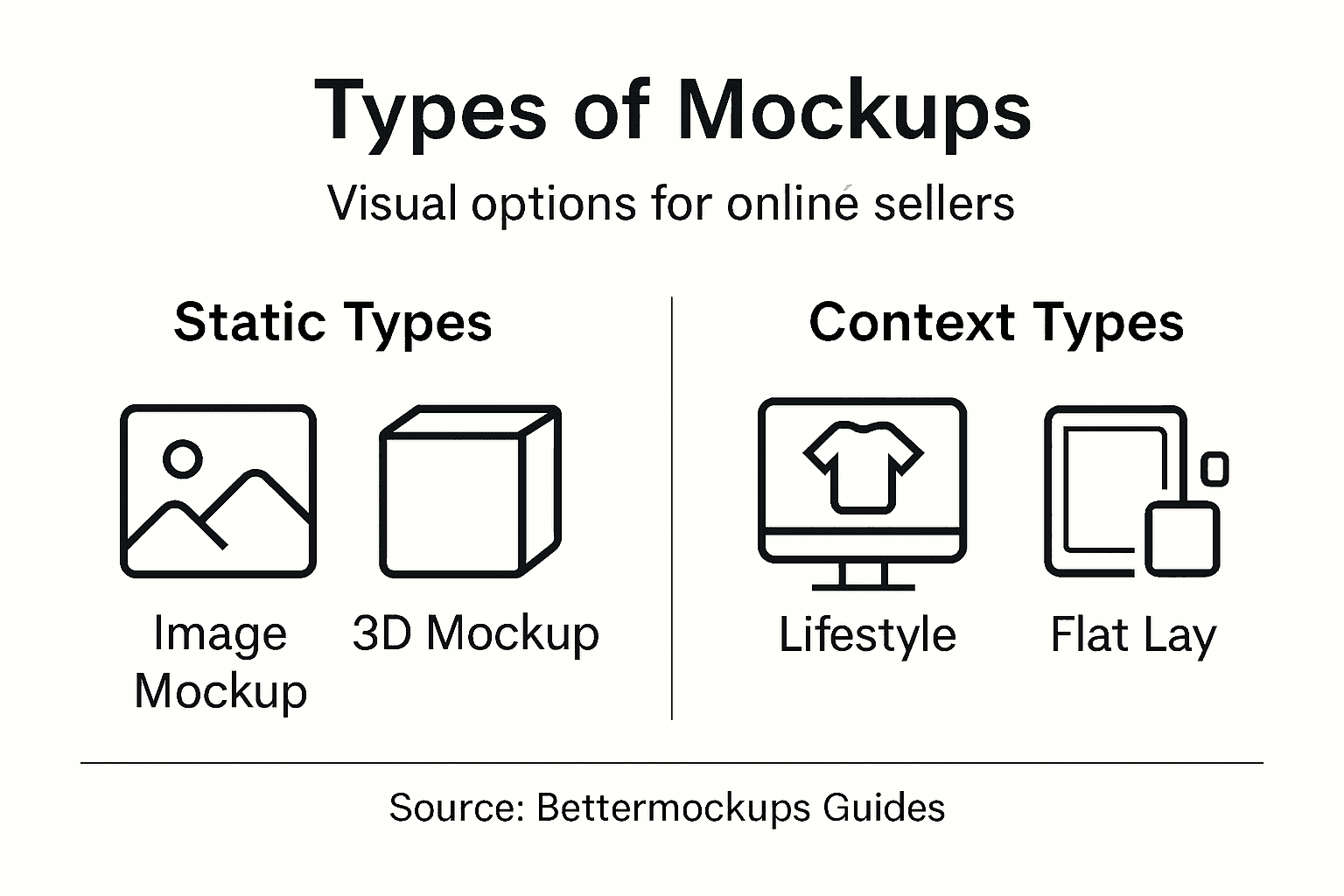
Fidelity level is another crucial distinction. High-fidelity mockups include photorealistic shadows, reflections, realistic lighting, and true-to-life textures that make customers feel they’re looking at an actual product photograph. Low-fidelity mockups use simpler representations, sometimes with colored overlays or basic shading, which work well for rapid prototyping or budget-conscious sellers but lack the conversion power of detailed visuals. Video mockups, which are increasingly popular on platforms like TikTok and Instagram, show your phone case design in motion, rotating slowly or displaying different angles in sequence. These capture attention as customers scroll and create a memorable impression that static images cannot match.
Here’s how different mockup types support your sales strategy:
| Mockup Type | Best Use Case | Impact on Buyer Behavior |
|---|---|---|
| Static Image | Product listings (Amazon/Etsy) | Clear preview, fast loading speed |
| Lifestyle | Social media, website banners | Builds emotional and lifestyle appeal |
| 3D Mockup | Online stores with interactivity | Boosts confidence, shows details |
| Flat Lay | Highlighting complex designs | Focuses attention on design itself |
| Video Mockup | Social ads, TikTok/Instagram | Grabs attention, shows product in use |
Pro tip: Test at least one high-fidelity static mockup, one lifestyle mockup, and one 3D or video mockup on your best-selling phone case design, then compare conversion rates and average order value across these presentation types to identify which mockup style resonates most with your customer base.
How Mockups Enhance Visual Branding
Your brand is more than just a logo or a company name. It’s the entire visual experience your customers encounter from the moment they discover your phone case or AirPods case until they unbox their purchase. Mockups play a critical role in building consistent, recognizable branding across every touchpoint. When you present your products using professionally designed mockups, you’re communicating that your business takes quality seriously. A customer who sees your phone case displayed in a high-fidelity mockup with perfect lighting and realistic shadows develops a different perception than one who sees a hastily photographed flat image. That perception directly influences whether they add your product to their cart or keep scrolling past your competition.

Consistency across your brand identity becomes dramatically easier with mockups. Unlike physical photography, which varies based on lighting conditions, camera angles, and background elements, mockups provide standardized visual presentations that maintain your brand’s aesthetic across Amazon, Etsy, Instagram, TikTok, and your own website. Your phone cases always appear in the same professional context, with the same color palette and design emphasis. This consistency builds trust and makes your brand instantly recognizable. When a customer sees one of your products on social media, they can immediately identify it as yours because the visual style is distinctive. How to use phone case mockups to sell more effectively requires understanding how each platform displays your mockups, but the foundation remains the same: a strong, consistent visual identity that communicates professionalism and attention to detail.
Mockups also enable you to tell a brand story without expensive production costs. You can create lifestyle mockups that show your AirPods case in aspirational settings, reinforcing the lifestyle your brand represents. A mockup might display your case alongside premium tech accessories, suggesting sophistication. Another might show it in a creative workspace, appealing to artists and designers. These narratives build emotional connections that plain product images cannot achieve. Additionally, mockups allow you to maintain brand consistency even when working with freelance designers or multiple vendors. A well-designed mockup template ensures that variations of your products stay visually aligned, creating a cohesive product line that feels intentional rather than random.
Beyond aesthetics, mockups protect your brand reputation. Poor quality product images suggest a poor quality product, even if your actual phone case or AirPods case is exceptional. Professional mockups demonstrate that you’re invested in presenting your inventory in the best possible light, which customers interpret as confidence in your product quality. This psychological effect translates directly into higher conversion rates and fewer returns driven by expectation mismatches. When what customers receive matches the professional presentation they saw online, satisfaction increases and negative reviews decrease.
Pro tip: Create a brand mockup template library using consistent backgrounds, lighting styles, and design elements, then apply these templates across all your phone case and AirPods case designs to build immediate brand recognition that customers associate with quality and professionalism.
Using Mockups in E-Commerce Marketing
Mockups have become essential tools for e-commerce marketing because they solve a fundamental problem that sellers face: the gap between imagination and reality. When you’re running paid ads on Facebook, Instagram, or Google Shopping, the image quality directly impacts your click-through rate and cost per acquisition. A blurry phone case photo or poorly lit AirPods case mockup might cost you 30 percent more in advertising spend compared to a professional, high-fidelity mockup showing the same product. Marketing platforms reward engaging visual content, and nothing engages better than a mockup that makes customers feel like they’re looking at a real product rather than a digital rendering.
Social media marketing becomes significantly more effective with mockups designed specifically for each platform. Instagram feeds favor lifestyle mockups showing your phone case in real-world scenarios that align with your target audience’s aspirations. TikTok videos perform better when they feature animated or rotating mockups that grab attention in the first second before someone scrolls past. Pinterest users respond to mockups placed in mood board contexts, seeing your AirPods case alongside complementary lifestyle elements. Email marketing campaigns that feature mockups instead of flat design images generate higher click rates because mockups create a sense of product reality that drives urgency. A phone case mockup generator allows you to quickly create variations for testing different marketing angles without waiting for expensive photo shoots or hiring designers for each new campaign iteration.
Retargeting campaigns, where you show products to users who previously visited your site, benefit enormously from high-quality mockups. These customers already showed interest, so your job is removing any remaining doubt. A professional mockup displaying your phone case from multiple angles, showing the design clarity, and demonstrating the product’s thickness and premium feel addresses objections that generic images cannot. You can create different mockup variations highlighting different features, then test which version converts best for different audience segments. Video mockups showing your AirPods case opening and closing create particularly strong retargeting content because they demonstrate product functionality in a way static images cannot.
Influencer partnerships and user-generated content campaigns also benefit from mockups. When influencers receive mockups rather than low-quality design files, they present your products more professionally to their followers, improving your brand perception. Mockups establish a visual standard that makes all user-generated content featuring your phone cases look cohesive, even when customers are photographing actual products. This consistency across different content sources builds brand authority and makes your product line appear more established and trustworthy than competitors still relying on amateur product photography.
Pro tip: Create at least three mockup variations for each phone case design targeted at different customer personas, then A/B test these mockups across paid social campaigns to identify which visual presentation generates the lowest cost per click and highest conversion rate for each segment.
Common Mockup Pitfalls and How to Avoid Them
Mockups seem straightforward until you realize they can actually hurt your sales if done poorly. The biggest mistake phone case and AirPods case sellers make is treating mockups as finished products rather than tools for communication. A common issue with mockups is setting unrealistic expectations since they are non-functional and purely visual, which means customers sometimes receive products that look slightly different from what they saw online. The mockup showed perfect lighting and pristine presentation, but the actual phone case has slight texture variations or the camera angle made the design appear larger than it actually is. This expectation gap leads to returns, negative reviews, and wasted marketing spend. The solution is being transparent about what mockups represent and using multiple angles to show realistic product proportions.
Overly complicated mockups confuse rather than convince. Some sellers create elaborate lifestyle scenes with multiple props, busy backgrounds, and distracting elements that pull attention away from the actual phone case design. Your customer should immediately understand what they are buying, not wonder what the central product is among clutter. Similarly, inconsistent mockups across your product line create an impression of disorganization. One phone case mockup shows the design at a certain size and angle, while another shows it differently, making your product line appear haphazard. Avoid this by establishing mockup guidelines before creating variations. Decide on background style, lighting direction, device positioning, and design sizing, then apply these standards consistently across all your AirPods cases and phone cases. A unified visual approach builds brand coherence that scattered, random mockups cannot achieve.
Another critical pitfall is using mockups that misrepresent product dimensions or material properties. A mockup showing a phone case that appears paper thin when your actual product is substantial does a disservice to your design. Customers may feel deceived when the product arrives thicker or bulkier than expected. Similarly, mockups that overemphasize glossiness or use filters that don’t match your actual printing method create problems. If you use matte printing, your mockup should reflect matte properties, not mirror-like reflections. The mockup is a promise about what customers will receive, so accuracy matters enormously. When in doubt, compare your mockup directly to a physical sample of your actual product before using it in marketing.
Many sellers also fail to update mockups when product specifications change. You update your phone case material or switch to a different manufacturer, but you keep using the old mockup because it looks good. This inconsistency between promise and reality damages trust. Make mockup updates part of your regular product review process, especially before launching new designs or seasonal variations. Finally, avoid the temptation to over-edit mockups with filters, extreme contrast adjustments, or colors that don’t exist in reality. Authenticity builds trust far better than aspirational but inaccurate representations.
The table below highlights common mockup pitfalls and effective solutions:
| Mistake | Consequence | How to Avoid |
|---|---|---|
| Unrealistic lighting or size | Customer returns, negative reviews | Use photos for cross-checking |
| Busy or cluttered backgrounds | Distracts from product, less trust | Keep mockups clean and simple |
| Outdated mockup after product change | Loss of credibility, confusion | Update mockups with every change |
| Inconsistent styles across products | Brand appears unprofessional | Use standardized mockup templates |
Pro tip: Before uploading any new mockup to your listings, photograph your actual phone case or AirPods case and compare it directly to the mockup image to verify that dimensions, colors, texture appearance, and design sizing match reality, then make adjustments until the mockup accurately represents what customers will receive.
Elevate Your Product Presentation with Professional Mockups
Struggling to convey the true look and feel of your phone case or AirPods case designs can limit your sales potential and reduce customer confidence. This article highlights the importance of realistic mockups to eliminate doubt and create a strong emotional connection with your buyers. If you want to turn browsers into loyal customers, high-quality visuals are a must. That is where Bettermockups steps in, offering photorealistic and customizable mockup templates perfectly suited for digital product sellers like you.
Discover our extensive collection including MacBook Case Mockups - Laptop Skin Case Mockups and Phone Ring Holder Mockups. Each mockup is designed to give your product the exact presentation it deserves with multiple angles, realistic lighting, and premium detail. Don’t let poor visuals hold back your brand image or sales. Visit Bettermockups now, grab your perfect mockup templates, and watch your conversions soar with confidence-boosting product presentations.
Frequently Asked Questions
What is a mockup in product design?
A mockup is a high-quality visual representation of a product that showcases how the final item will look, allowing sellers to present their designs without needing physical prototypes.
How do mockups enhance product sales?
Mockups create realistic and engaging visuals that reduce purchase hesitation, align customer expectations with the actual product, and improve conversion rates.
What types of mockups are there for e-commerce?
Common types include static image mockups, lifestyle mockups, 3D mockups, flat lay mockups, and video mockups, each serving different marketing needs and enhancing buyer engagement in unique ways.
Why is consistent branding important when using mockups?
Consistent branding through mockups reinforces brand recognition and professionalism, making it easier for customers to identify products, which can lead to higher trust and sales.
Recommended
- How to Use Phone Case Mockups to Sell More – Bettermockups
- Your Guide to a Phone Case Mockup Generator – Bettermockups
- Your Free iPhone Case Mockup: Your Complete Guide – Bettermockups
- Your Guide to a Perfect MacBook Case Mockup – Bettermockups
- Product Photography for Amazon: A Guide to Images That Convert | Reddog Consulting Group


